Your box is connected. Here is what you can do with it.
A five-minute orientation: what you were handed, which tool to open, and what a good first question looks like.
You talk to the box from your laptop. The box talks to your data. Your records stay on your side of the wall.
What you have
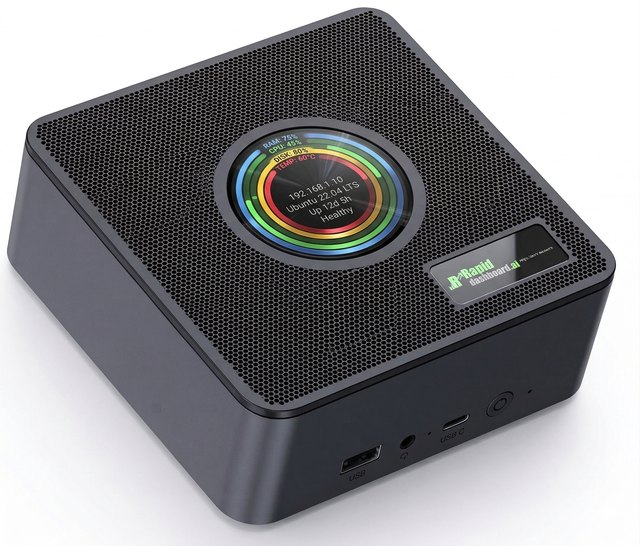
Your RapidDashboard box is a small, private computer running your build environment. It sits on the same network as your data, which is what lets it query production systems directly while your records stay inside the building. You never log into it like a desktop. You connect an AI editor from your laptop and talk to it.
dev.<your-client-code>.aibmm.ai
Your coach sends this after your SSH key is on file.
couleetech
A short lowercase name for your company, assigned during scoping. It appears in your box address.
/opt/stacks/<your-client-code>-app
The folder your editor opens. Everything you build lands here.
Your live sources: ERP, CRM, payroll, accounting, spreadsheets. Wired up by the team during deployment, read-only unless you asked otherwise.
The AI model that writes your dashboards. Preconfigured, and you can change which model it uses. See Using Rapid.Coder.
Your data stays inside your boundary. Prompts run against enterprise AI endpoints configured so your business data stays out of public model training. Dashboards themselves run as ordinary queries against your own data store, so the numbers reproduce the same way twice. The full posture is on Platform & Trust.
The four things you can do
Ask for a dashboard
Describe the view you want in one paragraph. The box writes the queries, picks the chart types, and assembles a page you can open and share. This is the fastest path from question to answer, and it is where almost everyone starts.
Quick start: build a dashboard 02Build a working app
Dashboards read. Apps also write. A CRM your sales team updates, a job scheduler your dispatcher drives, a monthly financial review that captures commentary alongside the numbers. Same conversation, bigger scope, built in stages.
Quick build: ship an app 03Add a data source
Your first connections came with deployment. New ones you can add yourself: a vendor API, a fresh CSV export, a second database. Get the credential, store it safely, describe the source, and let the box write the integration.
API integrations 04Spin up a new instance
When a build deserves its own walls, the Builder creates a separate Docker instance with its own database and its own address. Useful for separating a customer-facing app from your internal dashboards, or for giving a department its own sandbox.
The BuilderPick your tool
All four connect to the same box and run the same builds. The difference is the interface and how much of your team already knows it.
You can switch any time, and you can mix. The box holds the work, so your controller can use Cursor while your developer uses Claude Code on the same project. Set up the SSH connection once and every tool on this list uses it.
Before you start
Four things you need in hand. Your coach supplies the first two.
Looks like dev.couleetech.aibmm.ai.
The middle part of that address.
Generated on your laptop, public half sent to us. Walked through in Connect to your box.
Bring the number you actually chase on Monday morning.
Confirm with your coach Whether your deployment uses a shared box for the whole company or one instance per department, and who else already has access. This decides whether your first build is visible to colleagues immediately.
How a build actually goes
The loop is short. Most first dashboards take three or four rounds of this, and each round is a sentence or two of feedback.
One round takes a few minutes. You spend it writing two sentences.
You describe the outcome
Plain English, in the chat panel. Say what you want to see and who is looking at it.
The box explores your data
It reads the connected sources to find the tables and fields that answer your question. Expect it to ask a clarifying question when two fields could both mean "revenue."
It builds and shows you
Queries, charts, layout, all written as code and saved in your workspace. You get a link to open.
You correct it in one sentence
"Fiscal year starts in July." "Exclude intercompany transfers." "Make the trend line monthly instead of weekly." It edits and re-renders.
Check the first numbers against a source you trust. Pull one month from your existing report and compare. Getting agreement on that first figure is what makes the next fifty dashboards believable to your leadership team, and it usually surfaces a definition worth writing down.
Dev and production
Your box address starts with dev. for a reason. Everything you build starts in a development
environment where experiments are cheap and mistakes are contained. Work moves to production through a
reviewed path, which is what keeps a Tuesday afternoon experiment from becoming the number your board sees on
Thursday.
Where you prompt, iterate, and break things. Access is limited to your build team.
promotion
Where leadership dashboards and scheduled reports run. Change is controlled and monitored.
The mechanics of promoting a build are set up for your organization during deployment. Read the model on Platform & Trust.
Confirm with your coach How your team promotes a finished build from dev to production, who approves it, and what the production URL looks like for your organization. This differs by deployment mode: managed cloud, appliance, or your own cloud.
Talk to a human instead.
Every RapidDashboard client gets direct access to the team that built the box. Most questions take under ten minutes on a call.